
Complete Overview of Microsoft Power Automate
Microsoft Power Automate, formerly known as Microsoft Flow, is a cloud-based service that enables users to create automated workflows between various applications and services. It is part of the Microsoft Power Platform, which includes tools like Power BI and Power Apps, designed to optimize and automate business processes. Wikipedia
Key Features of Microsoft Power Automate
Why Businesses Choose Microsoft Power Automate
Who Should Use Microsoft Power Automate
Conclusion
Microsoft Power Automate is a versatile automation platform that empowers businesses to streamline processes, boost productivity, and drive digital transformation. With its user-friendly interface, extensive integration capabilities, and advanced features like AI and RPA, Power Automate addresses a wide range of automation needs across different industries and organizational sizes. Whether you're looking to automate simple tasks or complex business processes, Microsoft Power Automate provides the tools and flexibility to help your organization work smarter and more efficiently. microsoft.com
Your team closes deals. AI Agents handle the rest — finding the right prospects, enriching their data, running multichannel outreach, and routing inbound leads in minutes.




Hours lost every week to manual work they shouldn't have to do. Stale data, duct-taped workflows, and legacy databases built for a different era of sales. Four or five tools just to run one outbound campaign.
The rest is manual work — research, data entry, and switching between tools.
Stale data kills campaigns before they start. Wrong job titles, outdated emails, contacts who left the company months ago — every bad record is a wasted touchpoint.
Most teams juggle five separate tools — a database, signal tracking, enrichment, a sequencer, and sending infrastructure — none of them built to work together.
Discovery, fresh data, enrichment, and activation layer — unified in a single workflow. No middleware. No maintenance.
Most prospecting tools give you either data or automation — and charge enterprise prices for both. Leadspicker gives you the full workflow in one place, without the bloat.


Tell them who to find and where to look. AI Agents do the rest — monitoring sources around the clock, capturing matching prospects, and routing them to enrichment and outreach automatically.
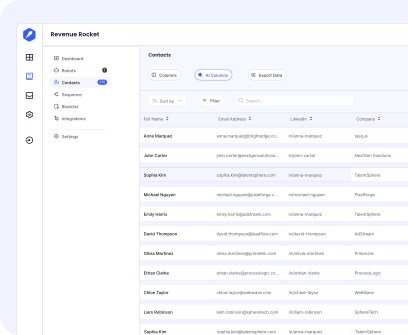

Don't settle for the first result. Leadspicker cascades through multiple data providers to find verified emails, phone numbers, and company data — maximizing coverage and minimizing bounces.

Show us a handful of your best customers. Leadspicker analyzes what they have in common, finds similar prospects across the internet, and delivers a ready-to-contact list.

Tell them who to find and where to look. AI Agents do the rest — monitoring sources around the clock, capturing matching prospects, and routing them to enrichment and outreach automatically.

A new lead fills out your form. Within minutes — not hours — Leadspicker enriches their profile, scores them against your ICP, and routes them to the right rep.

Stop fishing in the same databases as everyone else. AI Agents scrape virtually any source on the internet — LinkedIn, job portals, Google Maps, industry directories — to find prospects that don't exist in any static list.
Can't find what you're looking for?
Apollo and ZoomInfo give you large contact databases and tools, but you still have to find leads and run outreach yourself.Leadspicker automates the whole process by finding leads and contacting them for you using AI.
Most teams launch their first AI Agent and start generating leads within 30 minutes. No technical skills needed — describe what you want in plain language using the chat interface.
Virtually anything online. LinkedIn, job portals, Google Maps, company websites, industry directories, and custom sources tailored to your business. If it's publicly available, an Agent can find it.
Clay is strong at enrichment but has no built-in lead discovery or outreach. Leadspicker combines prospecting, enrichment, and multichannel sequences in one platform — with AI Agents that run autonomously. No complex setup.
No. Set up campaigns by describing what you want: "Find marketing managers at SaaS companies in Germany and start an email sequence." The chat interface handles the rest.
No. Set up campaigns, Yes. All data is encrypted in transit and at rest. Your data is never used to train AI models. For teams with strict compliance or security requirements, we also offer on-premise deployment — your data never leaves your infrastructure.
Leadspicker cascades through multiple data providers for each contact. If the first provider doesn't have a verified email or phone number, the next one picks up. This maximizes coverage and minimizes bounces — without per-contact credit costs.
Yes. Free 7-day trial — no credit card required.
Subscription-based plans with usage-based pricing for Agent actions. See our pricing page for details.
Yes. Leadspicker Agents can connect to anything with an API. Pre-built connectors are ready for HubSpot, Salesforce, Pipedrive, Google Sheets, Slack, and more. Need a custom integration? Agents can work with any REST API endpoint.
One platform replaces your prospecting database, enrichment tool, and sequencer. AI Agents handle the full pipeline so your team handles closing.
.svg)