AI Assistant

One prompt from idea to pipeline.

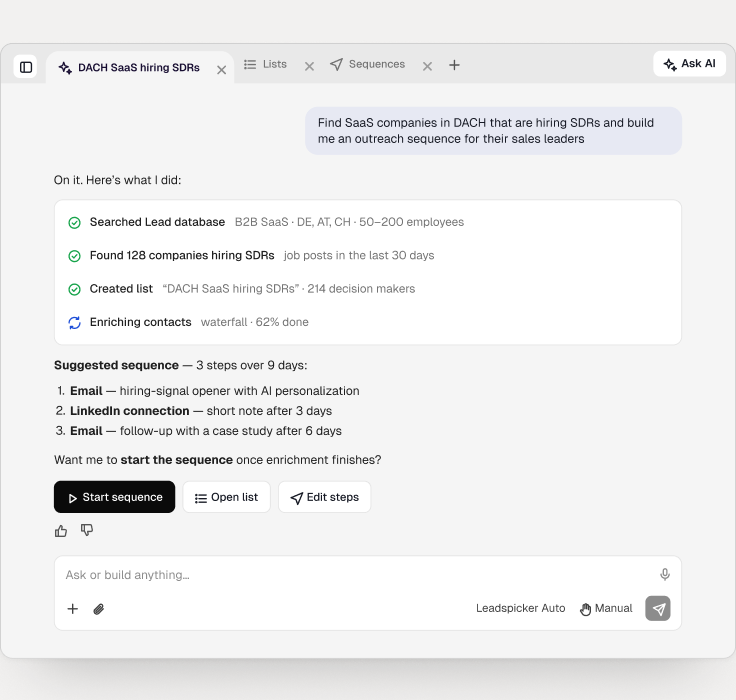
The assistant can use every Leadspicker tool: Lead database, routines, enrichment, sequences and the Unified Inbox. Choose Leadspicker Auto to let it act, or Manual to approve each step before credits are spent.

01

Ask or build anything

Find leads, build lists, write sequences and review campaign results, in plain language.

02

Works where you work

Chat in the app or in Google Chat, Slack, WhatsApp and Teams. Attach a CSV and get a cleaned, enriched file back.

03

Reports back on its own

Long-running jobs and scheduled checks post their results the moment they finish.

By the numbers

See pricing
1Prompt to launch a campaignFrom a sentence to a running sequence.
30+Tools the assistant can useLead database, routines, enrichment, sequences, inbox.
2Modes: Auto or Manual approvalLet it act, or approve each step.
0Workflow builders to learnNo rules, no canvas, no code.

What you can do

Explore the platform
Find new leads from a descriptionDiscovery
Write an outreach sequenceSequences
Review campaign resultsAnalytics
Enrich a CSV you attachFiles
Set reminders and scheduled checksAutomation
Use your saved skills with "/"Skills
Customer Success

The fastest growing
teams use Leadspicker

The most forward-thinking revenue teams automate outbound,
signal tracking ,enrich data, and unlock new growth channels - with less effort and more results.

4500
FAQ

Have questions?
We have answers.

Can't find what you're looking for?

Can I build automated, recurring lead lists?

Yes. Leadspicker Agents can connect to anything with an API. Pre-built connectors are ready for HubSpot, Salesforce, Pipedrive, Google Sheets, Slack, and more. Agents can also work with any REST API endpoint.

What does pricing look like?

Subscription-based plans with usage-based pricing for Agent actions. See the pricing page for details.

Can I try it before committing?

Yes. Free 7-day trial with no credit card required.

How does waterfall enrichment work?

Leadspicker cascades through multiple data providers for each contact. If the first provider doesn't have a verified email or phone number, the next one picks up. This maximizes coverage and minimizes bounces without per-contact credit costs.

Is my data secure?

Yes. All data is encrypted in transit and at rest. Your data is never used to train AI models. For teams with strict compliance or security requirements, we also offer on-premise deployment - your data never leaves your infrastructure.

Do I need to be technical to use it?

No. Set up campaigns by describing what you want: Find marketing managers at SaaS companies in Germany and start an email sequence. The chat interface handles the rest.

How is this different from Clay?

Clay is strong at enrichment but has no built-in lead discovery or outreach. Leadspicker combines prospecting, enrichment, and multichannel sequences in one platform - with AI Agents that run autonomously. No complex setup.

What data sources can AI Agents scrape?

Virtually anything online. LinkedIn, job portals, Google Maps, company websites, industry directories, and custom sources tailored to your business. If it's publicly available, an Agent can find it.

How long does it take to set up?

Most teams launch their first AI Agent and start generating leads within 30 minutes. No technical skills needed - describe what you want in plain language using the chat interface.

How is Leadspicker different from Apollo or ZoomInfo?

Apollo and ZoomInfo give you large contact databases and tools, but you still have to find leads and run outreach yourself. Leadspicker automates the whole process by finding leads and contacting them for you using AI.

Ask your first question

No credit card required · Setup in minutes · GDPR & CCPA compliant