Leadspicker in Codex
Codex gets the full Leadspicker server. Two commands connect it, and the installer adds the skills on top.
What you can do from Codex
Codex is at its best with a task that has a clear end. Three to start with:
- Find SaaS companies in the Nordics that are hiring account executives, and tell me how many there are before you import anything.
- Add an AI column to the list Nordic SaaS that scores fit from 1 to 5, and test it on the first ten rows.
- Show me this week's positive replies and the sequence each one came from.
Set it up
Two commands and a check.
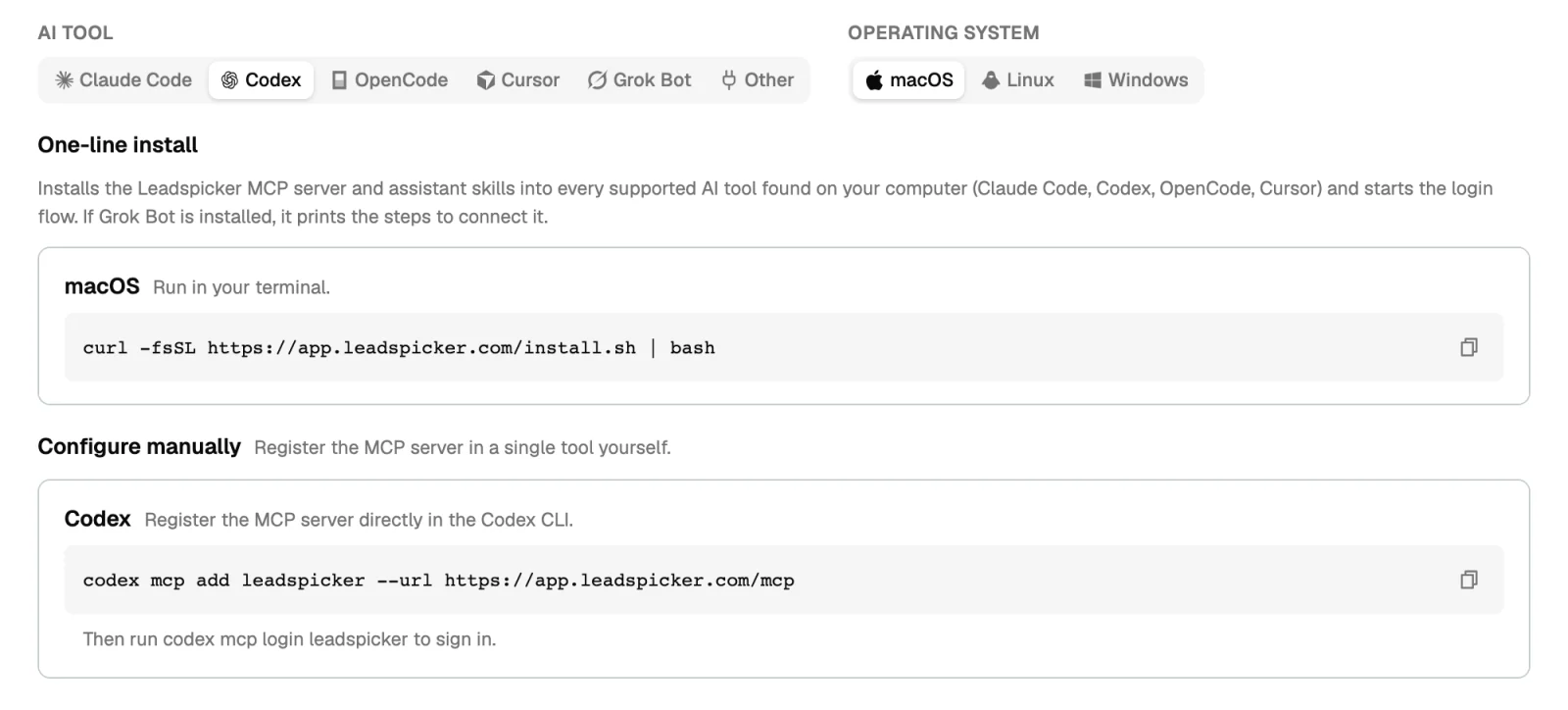
- Add the server
Run
codex mcp add leadspicker --url https://app.leadspicker.com/mcp. - Sign in
Run
codex mcp login leadspicker. A browser opens; sign in to Leadspicker and allow access. - Try it
Start Codex and ask it to list your Leadspicker lists.
The one-line installer does the first two steps for you and installs the skills as well: curl -fsSL https://app.leadspicker.com/install.sh | bash on macOS or Linux, irm https://app.leadspicker.com/install.ps1 | iex in PowerShell on Windows.
What gets installed
| Piece | What it is |
|---|---|
| MCP server | A server named leadspicker in the Codex CLI, pointing at https://app.leadspicker.com/mcp. |
| Skills | The leadspicker-… assistant skills, in ~/.agents/skills. Only the installer adds them. |
Limits
- Codex is on the full server, sending included. Ask it to show a draft before it saves or sends anything.
- The two manual commands add the server alone. Run the installer if you want the skills.
- Actions cost the same credits as in the app. The conversation itself runs on your own model.
The sign-in expired or failed. What now?
Run codex mcp login leadspicker again.
Do I need a Leadspicker API key?
No. Sign-in is OAuth in the browser.
Can I use Codex for an unattended script?
For a job with no conversation use the CLI. It needs no model at all.
Was this page helpful?
Still stuck? Email support@leadspicker.com or use the chat in the app.
Last updated 2026-11-12




